
Known Issue:
Tax grouping split in the tax details report
Impacted version:
- PH v23.4
- SG v23.7
- MY v23.8
Root cause:
When more than one tax code is having same value on the first 3 characters, the sorting sequence of the report heading has gone wrong.
Symptom:
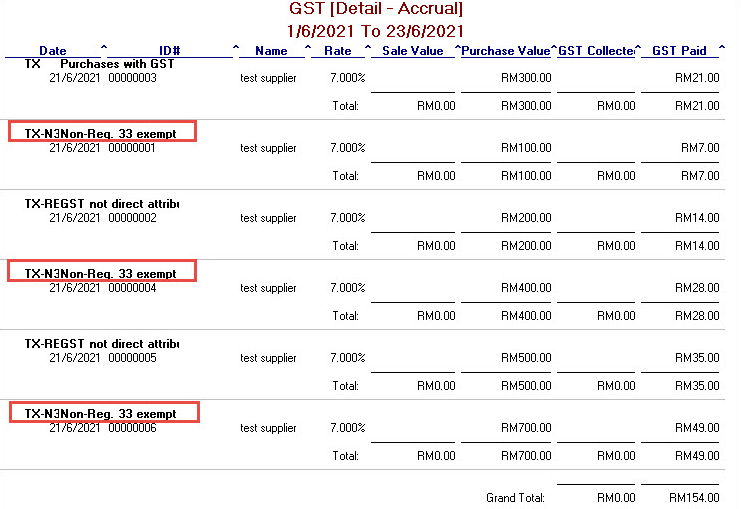
When you generate the GST accrual details or GST reconciliation details report with the tax code TX-N33 and TX-RE, the display of the same tax group has been split into different paragraph, see below example:
Workaround solution:
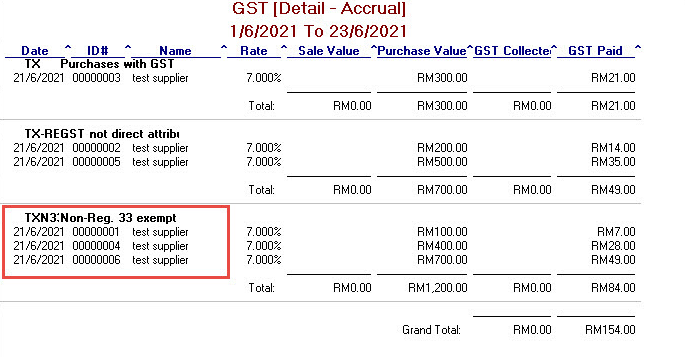
You can modify one of the tax code to become unique in Tax Code List window, eg. rename TX-N33 to TXN33. The report will then show the correct result after renamed, see below:
Plan for permanent fix:
We have also plan for a permanent fixed for the impacted regions in future version release. You may refer to the updates in the product release notes of the respective country.
Comments
0 comments
Article is closed for comments.