

This support notes are suitable for:
- ABSS Accounting
- ABSS Premier
- ABSS Payroll
- ABSS RetailManager
|
Introduction If you find that dates are displayed in a Month/Day/Year format, you need to change the Regional Settings within Windows. Go to Start, choose Control Panel and click Regional Settings or Regional and Language Options and make sure English(Australian) is selected. |
MYOB accounting software automatically reads the date format from your computer's operating system. When you change the format in your operating system, the date format in your MYOB accounting program will not change until you launch the program again.
Note for Premier Users: Each workstation must have its own date formats set.
I am using a Windows machine. How can I change the date format?
- Quit your MYOB Accounting Software application.
- Click Start > Control Panel > Regional Language Options.
- Select English (Australian) from the Country drop-down list. Click OK and follow any instructions given by your computer.
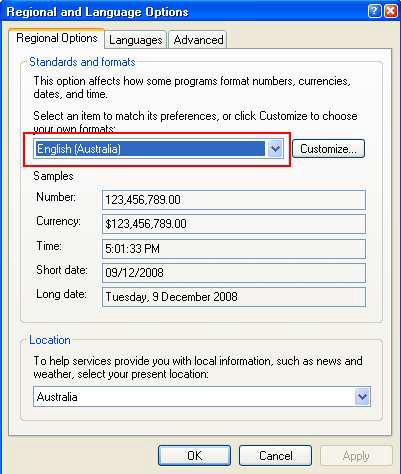
Note: For some reason if you system date is still showing a different format, you have to click on Customize > Date > change the Short date format to dd/mm/yyyy. Press apply and OK and restart your computer.
Comments
0 comments
Please sign in to leave a comment.