
This support notes are suitable for:
- ABSS Accounting
- ABSS Premier
- ABSS Payroll
- ABSS RetailManager
|
Introduction Your computer’s display settings will enable you to get the full functionality out of your MYOB software. When display settings are incorrect, it can cause MYOB windows to be displayed too big or too small, making MYOB difficult to use. This support note explains how to change these settings. |
How can I change my display settings?
MYOB‘s display is primarily reliant upon the operating system (Windows) display settings. However, MYOB internal display properties can be set.
Windows display settings
The recommended Windows display settings are 800 x 600 pixels with small fonts. This setting provides well balanced standard window sizes for most programs, including MYOB.
- Close all programs.
- Right-click on a blank space on your desktop and choose Properties.
- Click the Settings tab and note the current settings.
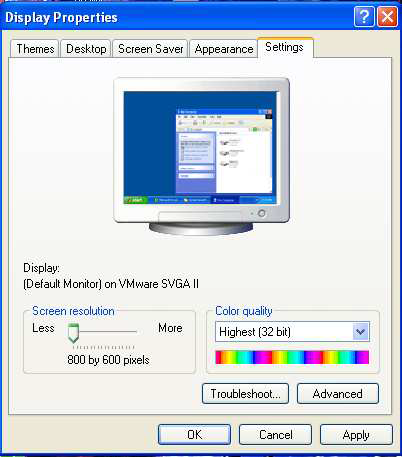
- Place your cursor on the Screen Area slide button and drag it so that 800 x 600 pixels is shown. Click the Advanced button, then click the Font Size drop down arrow and select Small Fonts from the list.
- Click Apply and then OK. Depending on your computer‘s configuration, you may be requested to restart it before the new settings take effect.
The following window shows a sample of the recommended Windows settings.
Note: Changing Windows display settings will affect the appearance of other programs.
MYOB display settings
MYOB‘s display settings give you control over the font used in all MYOB windows. Any font that is installed on your computer can be used as the display font.
- Open MYOB and go to the File menu, choose Default Fonts and click Windows.
- Select the desired font and font size from those respective fields. You can see the effects of the changes in the Sample field.
- Click the OK button. Close and re-open your data file for the changes to take effect.
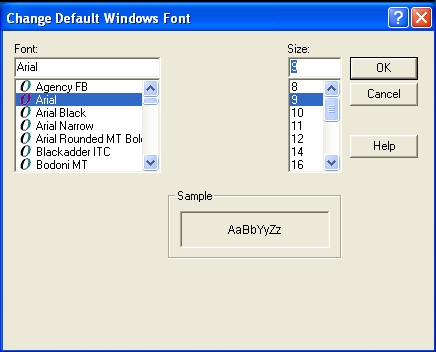
Note: Arial size 9 is recommended. If you are unable to select size 9, you can manually type it in the Size field. Helvetica is another recommended font.
Can the individual MYOB window sizes be changed?
Once the MYOB Windows display preference has been set, MYOB will ‘remember' window sizes and locations. For instance, if you change the size of the sales invoice window, when you exit that window, its size and location will be remembered for the next time that window is opened.
Open your data file and go to the Setup menu. Choose Preferences and click the Windows tab Mark the Save Windows Sizes and Locations option.
As you work in MYOB, adjust the window sizes and locations to suit your personal preference. MYOB will use those settings the next time that window is used.
Comments
0 comments
Please sign in to leave a comment.