

This Support Note is suitable for:
- ABSS Accounting
- ABSS Premier
|
Introduction Consignment stock, by definition, is a marketing arrangement whereby physical control of merchandise but not title, is transferred from one business (the Consignor) to another (the Consignee). The title to the goods remains that of the consignor until such a time as the goods are sold by the consignee. For this reason, consignment stock must be shown as an asset in the consignors' books until the consignee sells the goods. At this point, a sale occurs and the goods pass title. ABSS accounting software can be used as an effective tool in controlling consignment stock. For example, assume that you distribute the latest computer software to many computer stores around the country. A number of stores refuse to purchase the software outright from you, but will gladly sell this product on a consignment basis. This support note explains how to handle consignment stock as a consignor using the above scenario as an example. |
How do I enter consignment stock transactions?
Step 1 - Set up a dedicated asset account for consignment stock
-
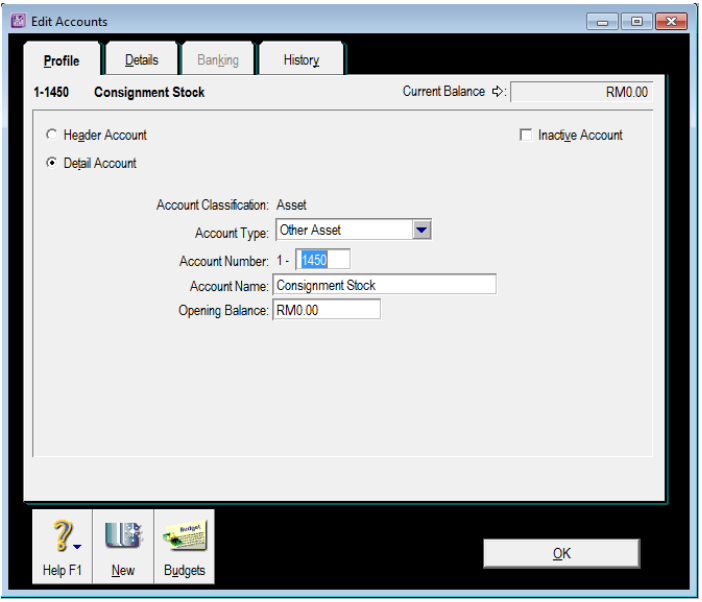
Go to the Accounts command centre and click Accounts List.
-
Click New and enter a unique account number that suits your account list.
-
Name the account Consignment Stock and click OK.
Step 2 - Set up inventory for Consignment Stock
Each line of inventory on consignment will require its own item number.
-
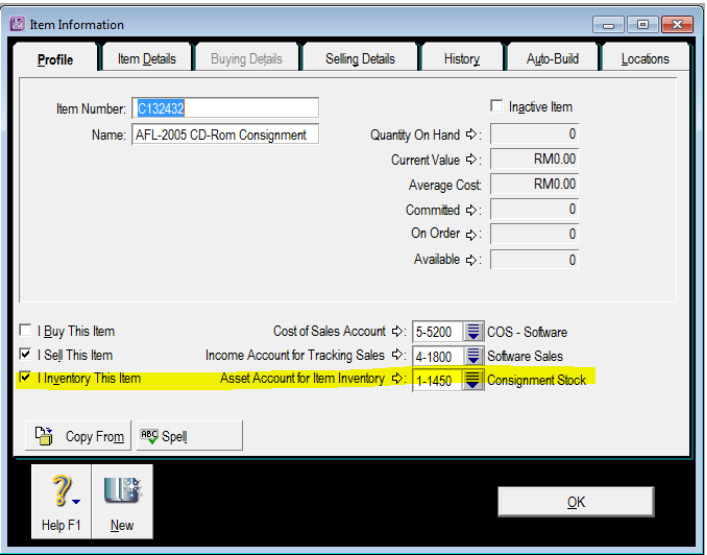
Go to the Inventory command centre, click Item List and click New to set up a new inventory item for the item being sent out on consignment. Use the same number as the existing trading stock item number, however precede it with the letter 'C'.
-
Mark the item as I Sell and I Inventory.
-
Make the asset account created in the previous step the Linked Asset Account for the C Item(s) in your Items List.
-
Make sure that the Income Account for Tracking Sales and the Cost of Sales Account are the same as those used by the trading stock item number.
Step 3 - Move stock from trading stock to consignment stock
-
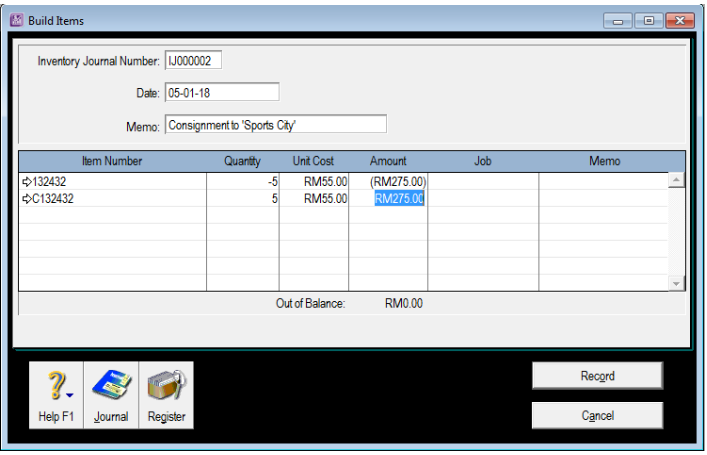
From the Inventory command centre, click Build Items to record a transaction to move the items from trading stock to consignment stock.
-
Enter or select the Item Number for the trading stock item and enter a negative (-) for the quantity you will be transferring. The current Unit Price (Average Cost) for this item will appear in the Unit Price field.
-
Enter in the Item Number for the consignment stock item and an equal opposing value that will be transferred. Fill in the same Unit Price (average cost) for this item.
Step 4 - Sell the consignment stock
When the consignee sells the consignment stock, you need to:
-
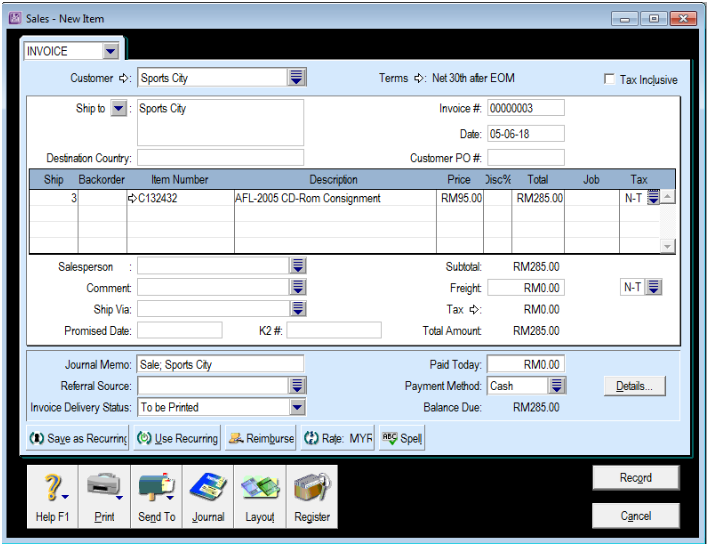
Create a sales invoice.
-
Sell the units of consignment stock. In this example, the consignee informs you that three units of C123432 have been sold.
-
Record the sale.
-
Settle the invoice through the Receive Payments window.
How do I enter Opening Consignment Stock?
Opening balances (stock that is already out on consignment at the time of conversion to ABSS) need to be included into the stock figures.
Option 1 - Build Items
Use this method if you are currently tracking both trading stock and consignment stock under the same item number.
-
Create the Consignment Items (See Set up inventory for Consignment Stock)
-
Prepare a Build Items transaction to move the stock from the trading stock item number to the consignment item number.
Option 2 - Count Inventory
Use this method if you are setting up inventory for the first time or your consignment stock is not included in the quantity levels of your trading stock.
-
Create the Consignment Items (See Set up inventory for Consignment Stock)
-
From Inventory, select Count Inventory.
-
Enter in the quantity of stock currently on Consignment for the new item numbers. Then click Adjust Inventory
Note. If you are starting a new data file, the stock is adjusted to the Consignment Stock asset account, as the value of stock on consignment would be entered as an opening balance in the Account Opening Balances.
-
At the Adjustment Information window click Continue
-
Enter the per unit value of the stock on consignment and record the adjustment.
What do I do when the Consignee returns stock?
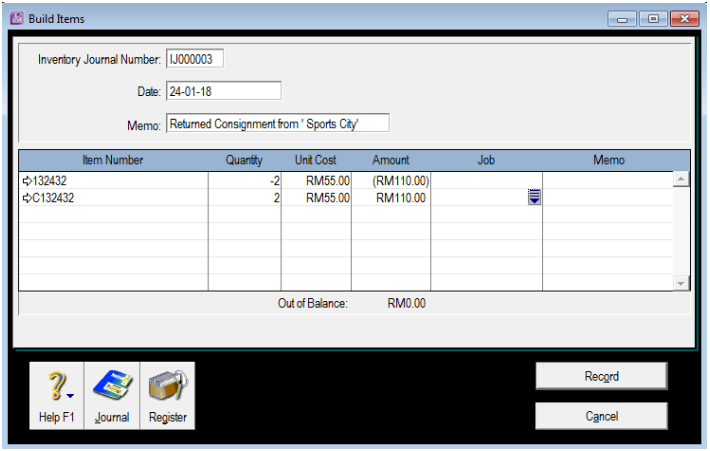
If a consignee returns stock, you need to complete a Build Items transaction to move the stock and its value from consignment stock back to trading stock.
Comments
0 comments
Article is closed for comments.