

This Support Note is suitable for:
- ABSS Accounting
- ABSS Premier
|
Introduction Consignment stock by definition is a marketing arrangement whereby physical control of merchandise, but not title is transferred from one business (the Consignor) to another (the Consignee). As Consignee, the title to the goods remains with the Consignor until the goods are sold. As a consequence, Consignment stock must not be shown as an asset in the Consignees books. ABSS accounting or premier software's can be used as an effective tool in controlling how much consignment stock you hold. To incorporate consignment stock into your figures, follow the steps below. For example, assume that you are the proprietor of a computer software store. You hold a number of lines on a consignment basis. At the end of each month you notify the consignor of consignment sales. The Consignor then invoices you for the stock sold. This support note explain how to handle consignment stock as a consignee using the above scenario as an example. |
How do I enter consignment stock transactions?
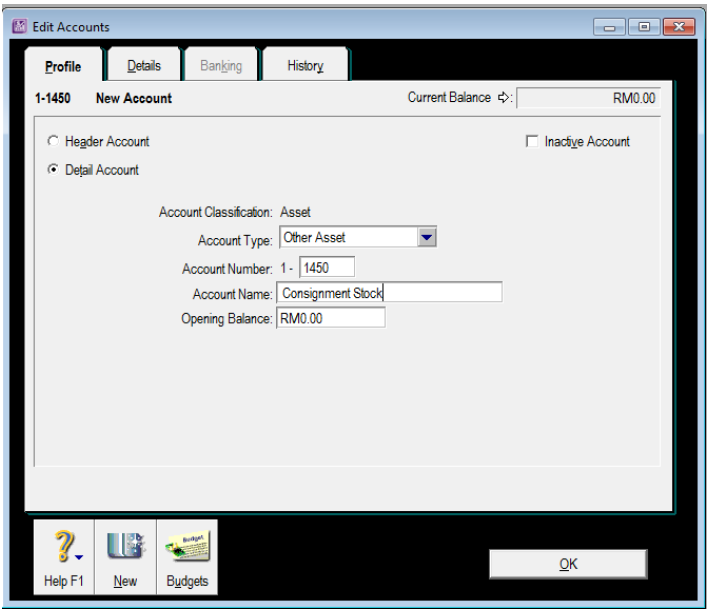
Step 1 - Set up a dedicated asset account for consignment stock
-
Go to the Accounts command centre and click Accounts List.
-
Click New and enter a unique account number that suits your account list.
-
Name the account Consignment Stock and click OK.
Step 2 - Set up inventory for consignment stock
Each line of inventory on consignment will require its own item number.
-
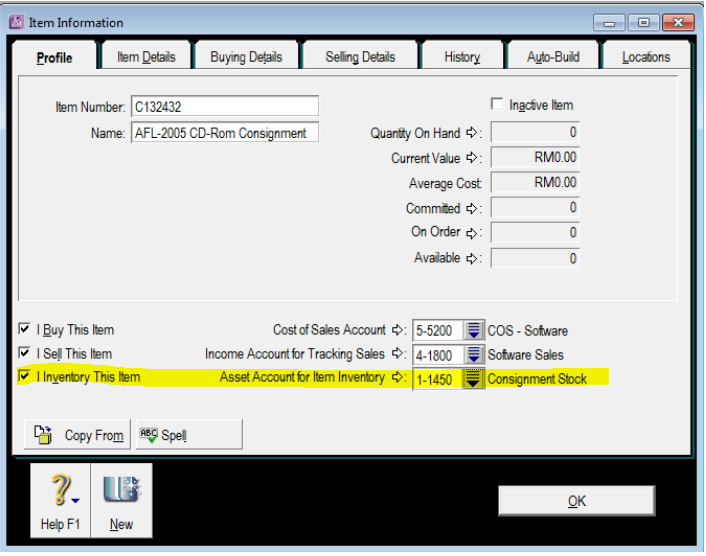
Go to the Inventory command centre, click Item List and click New to set up a new inventory item for the item being sent out on consignment. Use the same number as the existing trading stock item number, however precede it with the letter 'C'.
-
Mark the item as I Buy, I Sell and I Inventory.
-
Make the asset account created in the previous step the Linked Asset Account for the C Item(s) in your Items List.
-
Make sure that the Income Account for Tracking Sales and the Cost of Sales Account are the same as those used for the trading stock item number.
Step 3 - Prepare a purchase bill
Prepare a purchase order for the consignment stock items received. Purchase the consignment inventory at $0. You do not hold title to the goods so they should not be reflected in the balance sheet.
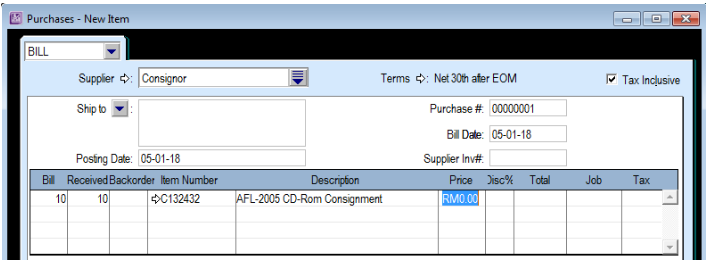
The $0 invoice will place inventory into stock with no value. This will mean that no Cost of Sales figure will be generated at the time the goods are sold. We will however be able to track the quantities of consignment stock on hand.
Step 4 - Sell the consignment stock
When selling the consignment stock items, use an item sales invoice. Make sure you use the same consignment stock item number.
Step 5 - Record a purchase bill
At the end of the month, you should notify the consignor of the stock that you have sold for the month. You should then be issued with a sales invoice from the consignor. Create a service or professional purchase order to record the purchase of the consignment stock.
Note that whilst you could also use a miscellaneous type purchase order, you should take into account that this type cannot be printed.
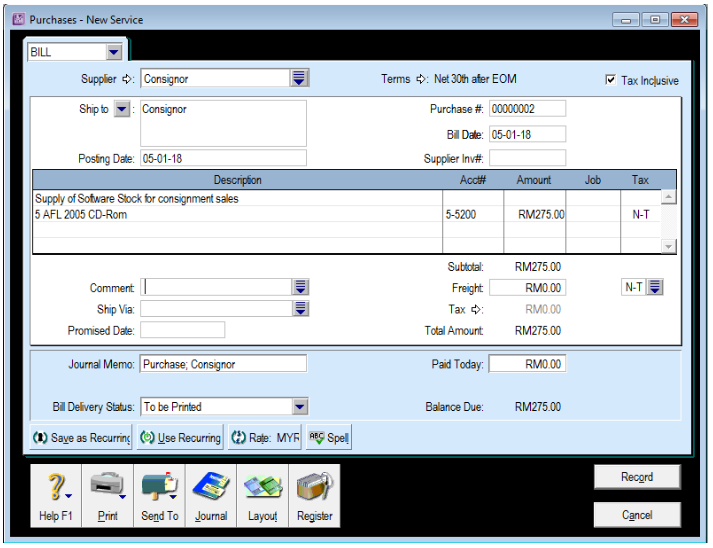
The account number used should be the linked Cost of Sales Account set up in the Item Information in Step 2. The Cost of Sales Account is used because title passes only once the goods have been sold. As the goods are sold, they should immediately be expensed to the relevant Cost of Sales Account.
How do I enter opening consignment stock on hand?
Create a purchase bill as detailed in Step 2. Once again, enter the purchase price at $0. The date entered on the purchase bill will be the conversion date.
No figure for consignment stock held will appear in the Balance Sheet. Consignment stock remains the property of the consignor until time of sale. As a consequence, consignment stock would never be shown as an asset in the consignee's books.
Please Note: This method will produce a cost of sales figure in the profit and loss statement, but it will not produce a cost of sales figure in any of the Analyse Sales reports. Analyse Sales reports obtain their information from the cost of sales figure generated when you record a sale. As a $0 cost of sales figure is being generated at the time of recording, these reports are unavailable. However, the correct cost of sales figure will be produced in the Profit and Loss report.
Comments
0 comments
Article is closed for comments.