

This support notes are suitable for:
- ABSS Premier
- ABSS Accounting
|
Introduction Sometimes expenses are incurred on behalf of a customer in the course of providing them with a service. The customer is subsequently billed for these expenses. By tracking your reimbursable expenses, you will be able to quickly invoice your customers for expenses incurred on their behalf. This support note explains how you can easily do this using your ABSS software. |
How do I setup my company data file to track reimbursable expenses?
Reimbursable expenses are tracked using Jobs. To setup a Job:
- Go to Lists, choose Jobs and click New.
- Enter the Job details.
- Mark the Track Reimbursables option.
- Select the Customer's Card in the Linked Customer field.
- Click OK to return to the Command Centre.
The following window shows the setup of a new Job.
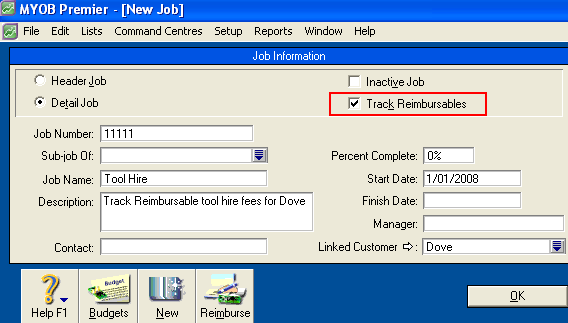
If you have existing Jobs, they can be setup to track reimbursables by selecting the Track Reimbursables option and selecting a Linked Customer. If an existing Job is altered to track reim bursables, expenses previously posted to that Job will be listed for reimbursement.
How are Jobs used for reimbursables?
Step 1 - Record the reimbursable expense
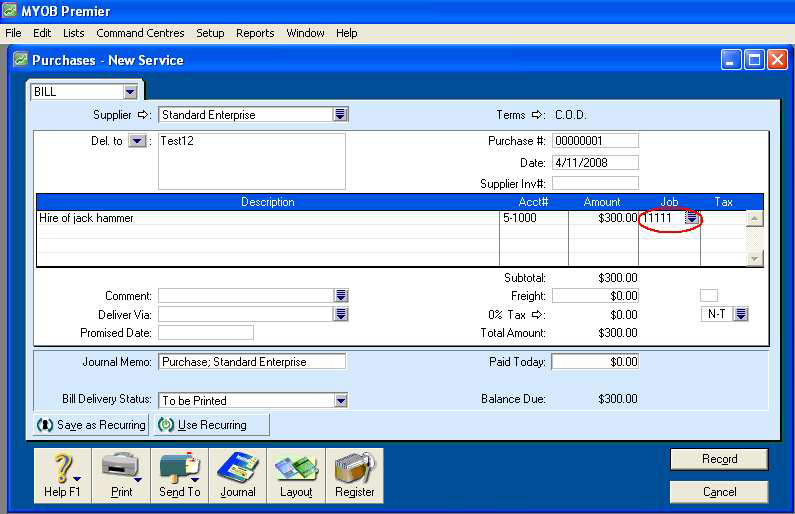
When recording an expense using a Bill or Spend Money transaction, enter the Job against the expense.
The following window shows a Bill that is to be reimbursed. Note the application of the Job Number 11111.
Step 2 - Invoice the customer for the reimbursable expense
Reimbursable expenses are recovered by invoicing the customer.
- Go to the Sales command centre and click Enter Sales.
- Select the Customer's Card that is linked to the Job.
- Set the Invoice Layout as required. In this example a Service Invoice is being used.
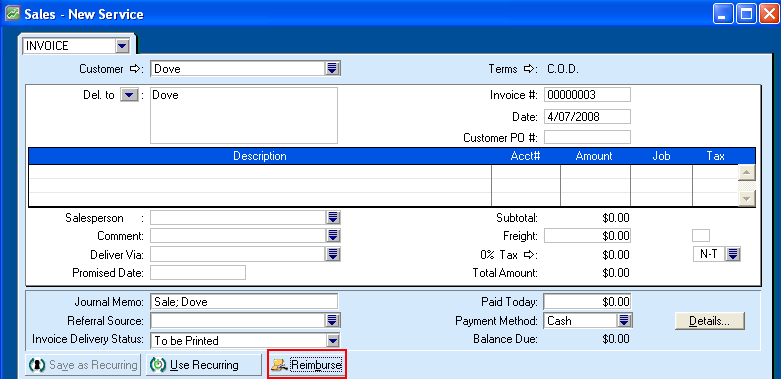
- Enter the Invoice header details: Select the Customer, enter a Date and any other details except for the actual line items that you are billing the customer for.
- Click Reimburse.
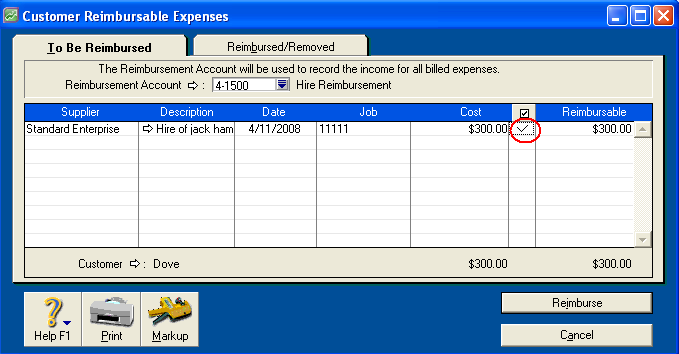
- Set the Reimbursement Account. If you are unsure which account to select, check with your accountant.
- Mark the expense you want reimbursed by clicking next to it in the column marked with the
 symbol.
 - Click Reimburse and then record the Invoice.
The window below shows the Customer Reimbursable Expenses window.
Please note: If a Time Billing or an Item type reimbursable Invoice is used, the Reimbursement Account field will be changed to accept either an Item or a Time Billing Activity.
Shown here are the upper sections of the Customer Reimbursable Expenses window for an Item type reimbursable Invoice and a Time Billing type reimbursable Invoice.


If the reimbursement invoice to the customer is deleted, can I repeat the process?
Yes. Once a reimbursable expense has been applied to an Invoice, its status changes from To Be Reimbursed to Reimbursed/Removed. You can change the status back to enable you to invoice it again.
To reapply a reimbursable expense:
- Go to Lists, click Jobs and click the white zoom arrow for the relevant Job.
- Click the Reimburse button at the bottom of the Job Information window.
- Click the Reimbursed/Removed tab.
- Mark the reimbursable expense by clicking next to it in the column marked with the
 symbol.
 - The window below shows the reimbursable expense selected to be returned to the To Be Reimbursed list.
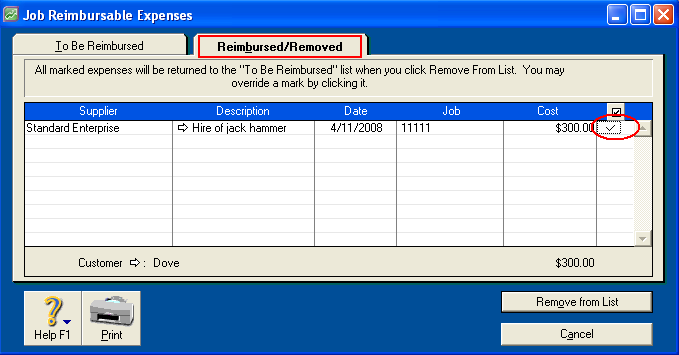
- Click Remove From List.
- Click the To Be Reimbursed tab to ensure the status of the reimbursable expense has changed.
- The reimbursable expense will again appear listed under the To Be Reimbursed list and can now be re-invoiced through the reimburse button of the sales entry screen.
Please note: Purchases of items that are marked as ‘I Inventory‘ are not tracked as reimbursable. This is because the job function tracks profit and loss type transactions which affect income and expense accounts. If you create a purchase for an item marked as ‘I Inventory‘, the transaction is allocated against the asset account setup for tracking inventory. It is not until you record a sale for the item that the cost of sale or expense for the item is realised.
Another way of thinking of this would be: if an item is marked 'l inventory‘ then it is trading stock that is generally sold to customers. As such, it is not a case of a reimbursable expense but rather a sale.
Comments
0 comments
Please sign in to leave a comment.