

This Support Note is suitable for:
- ABSS Premier
- ABSS Accounting
|
Introduction Occasionally, for various reasons, cheques are not presented to the bank by the payee. The usual outcome is to either cancel and reissue the payment, or just cancel it. Either way, stale cheques are easily accounted for in your ABSS program. This support note explains how this is done. |
How is a stale cheque accounted for?
A stale cheque is simply a payment recorded in your company file which won't be presented to the bank. Until an adjustment is made, your cheque account balance will be less than actual.To overcome this difference, the stale cheque will need to be reversed. This will place your bank account balance, and other affected account balances, in a position they would be in if the original payment hadn't been recorded.
How is a stale cheque reversed?
A payment will result in a withdrawal from your cheque account. Therefore, a deposit of the same value can be considered a reversal. With this in mind, the options to reverse a payment are:
- Manually record a deposit using Receive Money or a lournal Entry (general journal). If entering a manual reversal, ensure the allocation accounts on the stale cheque.
- Use MYOB‘s Reverse function. This is the recommended method and must be used if the payment was applied to a Bill using Pay Bills.
Please note:
- Using MYOB‘s Reverse function will provide you with a complete audit trail of the payment/reversal. |t‘s also the quickest and most accurate method.
- Deleting stale cheques isn't an option we recommend as it may affect the CST for a previously reported period.
Reversing the stale cheque - using the Reverse function
Step 1 - Setting MYOB's Preferences
Go to Setup > Preferences > click the Security tab > tick the Transactions Can't Be Changed; They Must Be Reversed > click OK.
Step 2 - Reversing the stale cheque
- Go to the Banking command center and click Transaction journal.
- Enter the date of the cheque in the Date From and To fields then press the <tab> key.
- Identify the stale cheque then click its zoom arrow.
- Go to Edit and choose Reverse cheque Transaction.
- Check and edit the reversal transaction details then click Record.
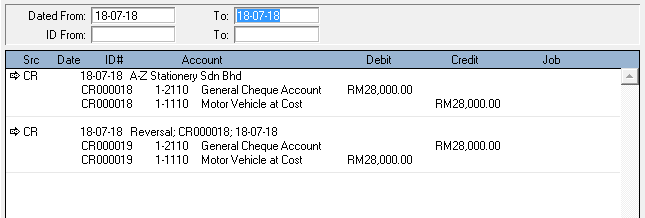
The window below shows the ledger postings of a typical Spend Money payment and reversal.
Please note
If the payment (Pay Bills or Spend Money) isn't going to be reissued, then use Receive Money to reverse the payment. Allocate the deposit reversal to the original expense account. Or, create a new Income account called Unrealised Expenses and allocate it to this account.
Step 3 - Reissue the payment
If the payment is to be reissued, then use the same payment type that was used for the stale cheque. For example: Reversing a Pay Bills payment will cause the status of the closed Bill to revert back to Open. Therefore, use Pay Bills again when reissuing the payment.
Similarly, use Spend Money if the original transaction was entered using Spend Money.
Step 4 - Reconcile the cheque account.
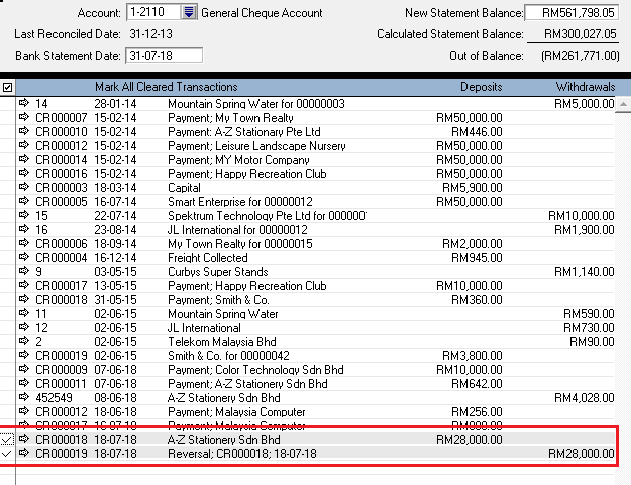
When you next reconcile your cheque account, you will need to select both the stale cheque (withdrawal) and the reversal (deposit) as Cleared. As they are for the same amount, they will negate each other leaving your cheque account balance unaffected. The window on the following page shows the Reconcile Accounts window with both the stale cheque and the reversal selected as Cleared. It also includes the reissued payment which is yet to be presented to the bank and is therefore not selected as Cleared.
Do stale cheques affect the GST? (Applicable for country with GST only)
- Pay Bills - GST input tax credits are recorded with the Bill, and not the payment (Pay Bill payment) applied to it. Therefore, Pay Bills payments can be freely reversed and re-entered without affecting the GST, if reporting your GST on accrual basis.
- Spend Money - Regardless of the CST reporting method, reversing a Spend Money payment will reverse the CST input tax credit claimed on the original payment.
What if the stale cheque is dated in a previous financial year?
Transactions dated in a financial year prior to your company file's Current Financial Year, can only be reversed. Also, as transactions can't be recorded in a previous financial year period, the reversal will need to be dated in the current period. To determine your data file's Current Financial Year, go to setup and choose Company Information. It is recommended Receive Money be used to record these reversals. By using Receive Money, you can allocate the reversal to an Income account (4-xxxx) named Unrealised Expenses, which you may need to setup. Alternatively, allocate the reversal to the expense account used on the original payment. And again, use the same Tax Codes that were used in the original transaction.
Please seek your accountant's advice regarding any tax implication this may have.
Comments
0 comments
Please sign in to leave a comment.