

This Support Note is suitable for:
- ABSS Premier
- ABSS Accounting
|
Introduction ABSS Accounting software's 13th period provides a convenient method of dating certain transactions so they don't affect a particular reporting period. This support note explains how to enter these transactions and how to include them and exclude them from reports. |
What is the 13th period?
In normal accounting practices, there are twelve reporting periods in a financial year. Each of these periods is represented by a calendar month, and is therefore a determined chronological period.
The 13th period isn't an actual period of time; it's merely a 'placeholder' period that contains yearend adjustments. Transactions dated in the 13th period are done so with the intention of the transaction not affecting any one of the twelve actual reporting periods.
When would the thirteenth period be used?
Common business reports, such as the profit and loss report, base themselves on transactions that are dated within the report date range. However, it is not always practical to have a transaction influence one particular reporting period.
For example: A piece of machinery of a manufacturer fails unexpectedly. The repair is expensive and will have an adverse effect for the particular month's reporting.
This type of expense could be dated in the 13th period, avoiding the expense being attributed directly to the affected month.
The 13th period is also quite commonly used for end of year adjustments such as prepayments and accruals.
Does my data file need to be setup for 13 periods?
The 13th period is an option when first setting up a company data file. It is also an option when starting a new financial year. You can easily check if your data file is currently setup for 13 periods: Go to Setup and choose Company Information.
If the Accounting Periods is Twelve, you will need to wait till you start a new financial year before the 13th period can be activated.
To activate the 13th period when starting a new financial year:
- Go to File choose Start a New Year and click Start a New Financial Year.
- Follow the on-screen steps until you get to the step shown here.
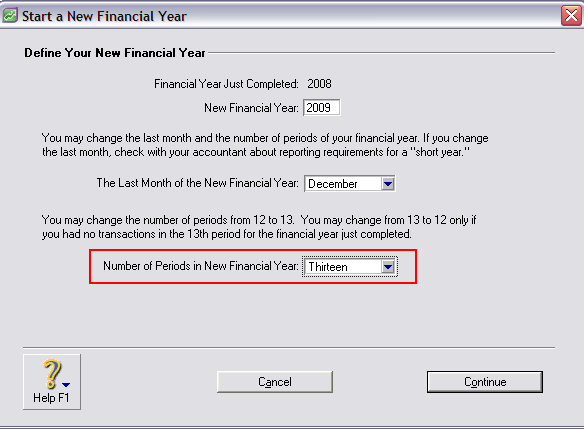
- Select Thirteen from the Number of Periods in New Financial Year drop down list.
How do I date a transaction in the 13th period?
With the thirteenth period activated in your company data file, simply place an asterisk (*) in front of the transaction's date in the Date field.
The window on the following page shows a Spend Money transaction dated in the 13th period.
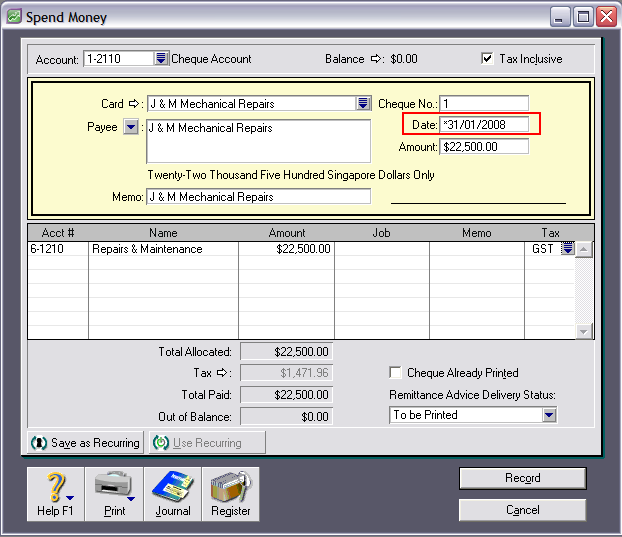
Please note the asterisk in front of the date in the Date field.
Can the 13th period be used for any transaction?
The 13th period is available for the following transaction types:
- Record Journal Entry
- Spend Money
- Receive Money
- Prepare Bank Deposit
- Bank Register (Spend Money and Receive Money transactions)
- Transfer Inventory
- Count Inventory
- Auto-Build Inventory
How are 13th period transactions reported?
13th period transactions can be reported by themselves, or they can be included with the conventionally dated transactions on an YTD basis.
When filtering reports and transaction listing, you will need to be mindful that the 13th period
transactions won't be included if an asterisk isn't used in the report Date field.
13th period transactions can be reported by themselves, or they can be included with the conventionally dated transactions. However when viewing 13th period transactions along with conventional dated ones they will only be shown as part of a YTD value.
Reporting transactions in both the conventional twelve periods AND the 13th period will reflect 13th period entries in the YTD balance regardless of the 'To' date selected. It will not reflect partial months/partial years of 13th period entries.
The 13th period cannot be reported as part of normal daily, weekly or monthly P&L and can only be reported on its own or as part of a YTD value.
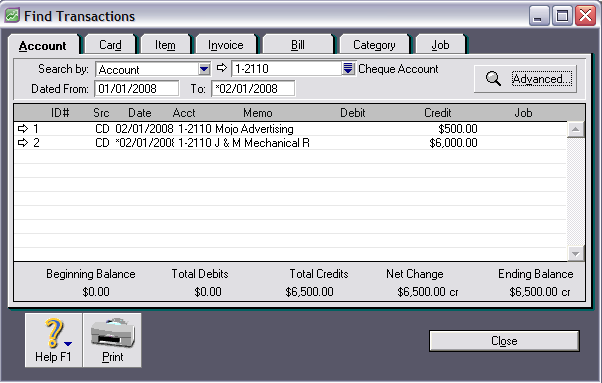
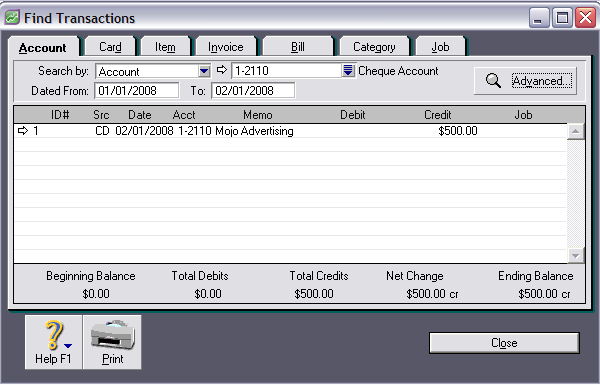
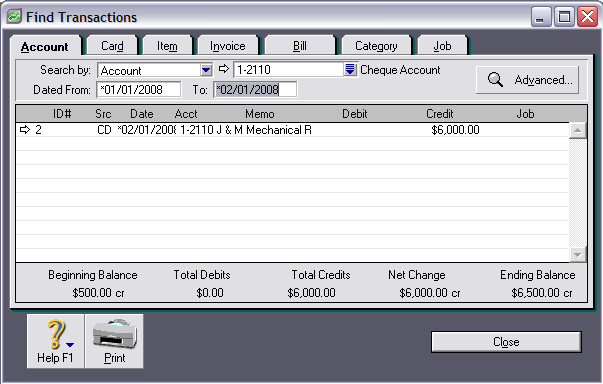
The below examples show the effects of the 13th period when filtering transactions in the Find Transactions Window. For the purposes of this comparison, two Spend Money payments have been entered for the same date. However, one is dated in the 13th period.
Example 1: Reporting transactions in both the conventional twelve periods AND the thirteenth period.
Enter an asterisk in the To Date field ONLY (From 01/01/2008 To * 02/01/2008).
Example 2: Reporting transactions within the conventional twelve periods. DO NOT enter an asterisk in either of the Date fields (From 01/01/2008 To 02/01/2008).
Example 3: Reporting transactions within the thirteenth period ONLY Enter an asterisk in BOTH the From and To Date fields (From *01/01/2008 To * 02/01/2008)
Comments
0 comments
Please sign in to leave a comment.