

This Article is suitable for:
- ABSS Premier
- ABSS Accounting
Introduction
Businesses who import goods into Singapore must be aware that all imported goods into Singapore are subject to GST. Since the supplier is not in Singapore it is not expected that he/she can charge the Businesses in Singapore for GST. The imported goods will get taxed upon when the goods landed in Singapore (Import GST). Singapore Import GST is computed based on transaction value including insurance and freight, all duties payables and other incidental charges. GST in Singapore on imported goods needs to be declared in a specific customs declaration form and the tax must be paid at the point of entry. GST is generally payable before the goods are released from customs control. However, a registered manufacturer is able to recover the GST paid on import by crediting the amount allowable against the output tax chargeable on the taxable supplies.
This support note will cover:
How to record GST on import goods for freight forwarder.
Scenario:
If the Taxable Business appoint the Freight Forwarders to release the Goods from Custom control and bill back the taxable business all the clearance charges and Import GST paid on its behalf.
Note: If the freight forwarder is trade creditors and bill you for the import GST and some other standard rate purchases, you need to enter the supplier bill (freight forwarders bill) and pay the bill later:
For example:
Transaction Value : $ 17,500.00
Import GST payable = $17,050 x 7% = $1,193.50
Freight Forwarders Transportation Charges from airport to warehouse: $1, 000.00 (Inclusive 7% GST)
Total Freight Forwarders Bill is $2,193.50.
Step 1 - How to Enter the Freight Forwarders bill under purchases module
1. Go to Command Center and click Purchases
2. Click Enter Purchases
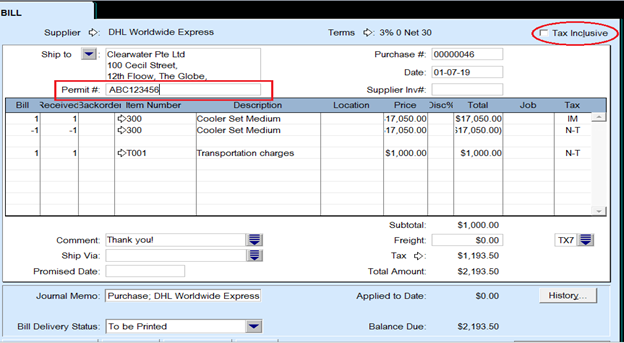
3. Key in the transaction as a bill
4. Make sure the tax inclusive check box is not checked
5. The Permit number field must be filled in.
Note:
For the Import GST portion, it is recorded using Tax basis amount in the first line, you can use formula: Import GST amount divided by 7% and the tax code is IM. Followed by second line with same amount as the first line but with negative sign and the tax code is N-T.
At the end the net amount is the import GST that needs to be paid. In this example, the tax basis is $17,050.00.
Step 2 - Pay the supplier bill
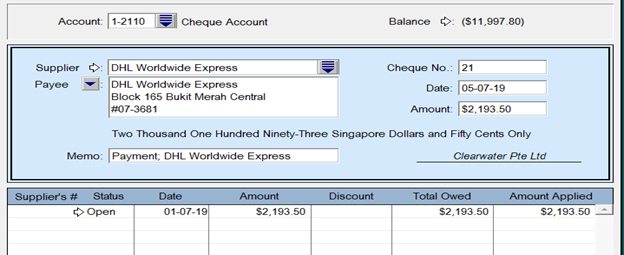
1. Go to Command Center and click Purchase
2. Click Pay Bills
3. Key in the amount accordingly and record.
Comments
0 comments
Please sign in to leave a comment.